South Beach Campground Map
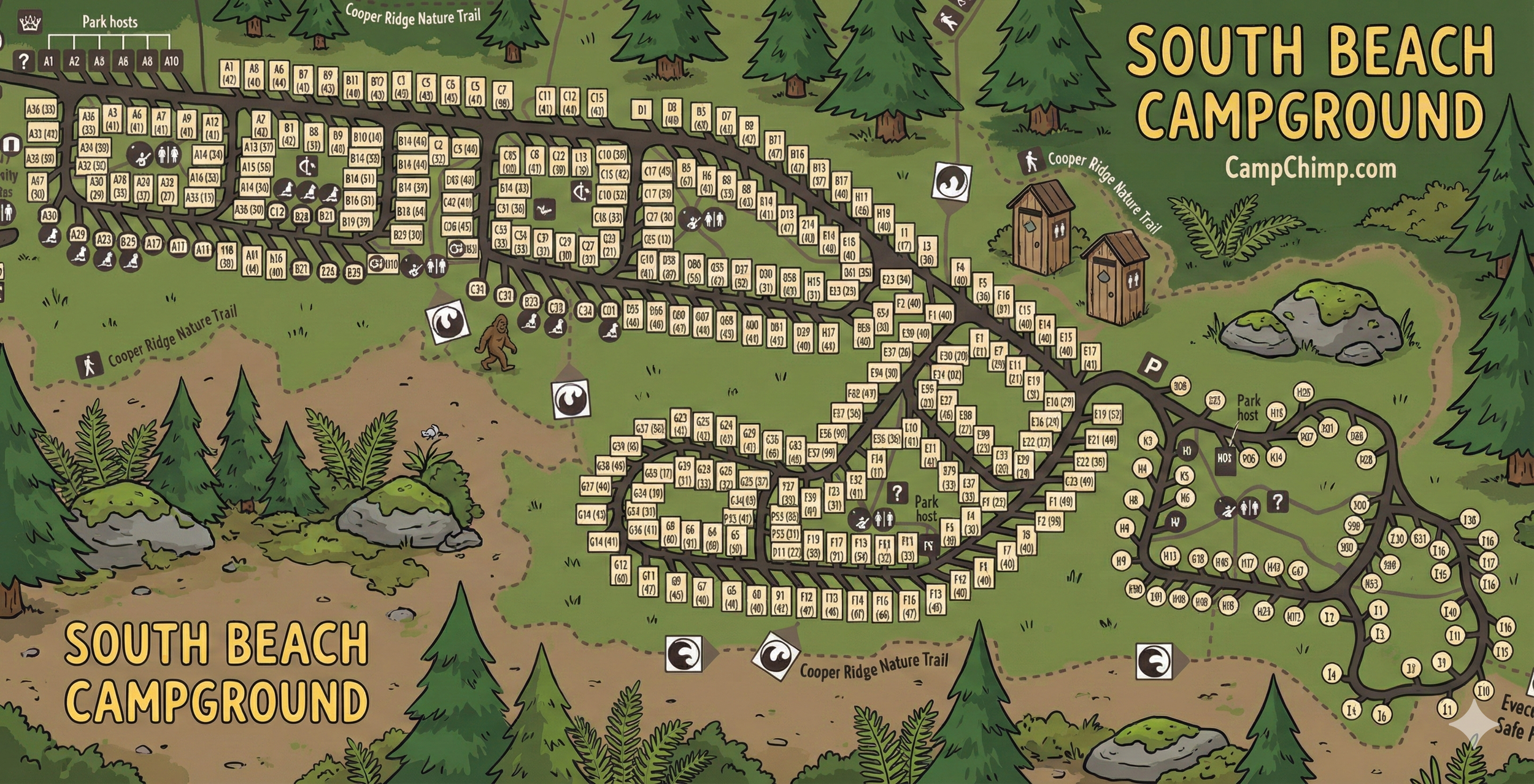
Use this South Beach Campground map to navigate loops, site labels, and on-map icons (restrooms, hosts, info points, parking) — map reading only.
Quick Orientation
Start by finding your loop letter, then follow the loop road until your site label (example: B12 or H7) matches what’s printed on the map.
Look for Park host markers, the ? info symbol, and restroom icons — these are your best “anchors” when you’re trying to confirm you’re in the right place.
Loop Layout (A–I)
- Loops A–D: The long “spine” section. Site labels appear as A#, B#, C#, and D# along the loop edges.
- Loop E: Short connector segment with E-labeled sites leading toward the right-side loops.
- Loops F & G: Central cluster loop — G sites are grouped together, with F sites on the connected stretch heading toward E.
- Loops H & I: The right-side loop area uses circular site labels (H# and I#). This area also shows a Park host marker and an info (?) symbol near the restroom icons.
If you’re arriving after dark: use loop letters first, then use restroom + “?” icons as your confirmation points before hunting the exact site.
How to Read Site Labels & Sizes
Most sites are shown as a letter + number (example: C14), and many include a second number in parentheses that appears to represent a length (commonly in feet on these style of campground maps).
- Square labels: Common for A–G sites in the main and central sections.
- Round labels: Used for H/I sites on the right-side loop area.
Icons & Landmarks on This Map
This map uses a handful of “decision icons” that make navigation faster than reading every site label:
- Restrooms: Cluster icons that you can use as reliable reference points inside each major area.
- Park host: Marked near the left section and again in the H/I loop area — helpful if you’re uncertain where a loop starts.
- Info ( ? ): Shown near the H-loop services cluster and near the A-loop area — use it like a “you are here-ish” landmark.
- P (Parking): A parking symbol appears near the H/I loop entrance area.
- Cooper Ridge Nature Trail: The dotted boundary/trail line labeled “Cooper Ridge Nature Trail” shows how the campground ties into nearby walking routes.
Tip: When you zoom in on a phone, focus on icons first (restroom/host/?/P), then pan outward to find the closest site labels.
Using the Map on Arrival
- Identify your loop letter (A–I) before you start driving deeper.
- Follow the loop road and read site labels in order—don’t jump around the map.
- Use icons as checkpoints (restrooms, host, “?”, parking) to confirm you’re in the correct section.
- For H/I, remember those sites are round-labeled and sit in the separate loop area to the far right of the main section.
South Beach Campground Map FAQ
How do I find my campsite quickly?
Match your loop letter first (A–I), then follow the loop road until your letter-number site label appears. Use restroom/host icons as checkpoints.
Why are some sites squares and others circles?
On this map, A–G sites are shown with square labels, while the H/I area uses round labels. Treat it as a visual cue that you’re in a different loop zone.
What’s the fastest landmark to orient myself?
The Park host markers, restroom icons, and the ? info symbol are the easiest “anchors” to spot, even when zoomed out.
Does the map show trail access?
Yes — the dotted line labeled Cooper Ridge Nature Trail indicates how the campground connects to nearby walking routes.