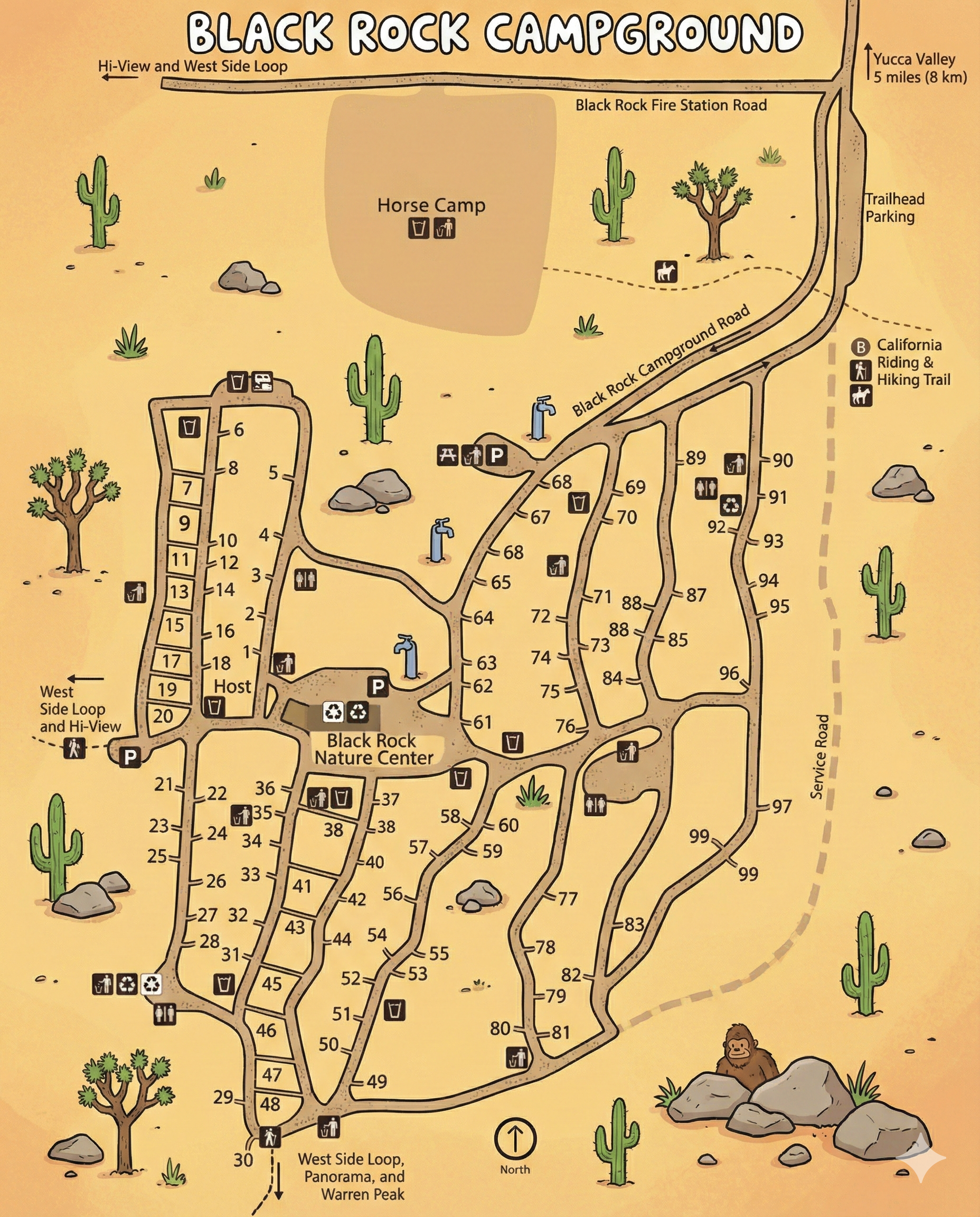
Black Rock Campground Map
This is a map-only guide to Black Rock Campground in Joshua Tree National Park. Use it to understand the campground road network, follow site numbers, and spot key services like restrooms, potable water, the nature center, and trail connections.
- The campground is split into a west-side spur (sites in the low numbers) and a larger east-side network (sites into the 90s).
- Black Rock Campground Road runs along the top and feeds the interior loops.
- The Service Road border is on the right side of the map; trailhead parking is near the top-right.
- Find the closest big anchor (Nature Center, Host, or a restroom cluster).
- Follow the road line to your site number—numbers sit right on the road edges.
- Use water + restroom icons as “checkpoints” when the roads fork.
Layout & Areas
Black Rock is not one single loop—think of it as two main zones connected by short interior roads:
The left side of the map contains a long spur with many low-numbered sites and a labeled Host area. It also connects toward the West Side Loop and Hi-View direction shown on the map.
The Black Rock Nature Center sits near the middle of the campground. Around it you’ll see a dense cluster of facility icons and short connector roads—use this as your “main crossroads” reference.
The right side of the map shows multiple winding lanes with many sites climbing into the 80s and 90s. This area borders the Service Road and sits closest to the trailhead parking area up top.
Campsite Numbering (What to Expect)
Site numbers are printed along each road segment. In practice: lower numbers tend to be on the west spur, while higher numbers are on the east network. When roads split, follow the road edge that continues the number run toward your target.
- If you’re heading to a site in the teens/20s, you’re likely using the west spur.
- If you’re heading to a site in the 60s–90s, you’re likely in the east network.
- If you lose the number run at a fork, back up to the nearest restroom or water icon and re-trace from there.
Facilities & Anchors Shown on the Map
The map includes multiple “anchor” icons you can use to confirm your location when the internal roads start to look similar:
- Restrooms appear in several clusters across both the west and east sides.
- Potable water is marked at multiple points—use these as navigation checkpoints.
- Black Rock Nature Center is a central landmark with nearby parking and facility icons.
- Host is labeled along the west spur.
- Horse Camp appears at the top portion of the map (separate use area).
Trails & Trailhead Access
Trail connections are marked on the right side of the map near the Service Road and trailhead area. The map labels California Riding & Hiking Trail access and shows trailhead parking near the top-right.
Practical trick: if you’re camping on the east side and hiking early, look for the closest internal lane that feeds toward the Service Road edge and the trailhead parking area.
Black Rock Campground Map FAQ
Is Black Rock one loop?
Not really. The map shows a west-side spur plus a larger east-side network connected by short interior roads.
Where is the Nature Center on the map?
The Black Rock Nature Center sits near the middle of the campground and is a strong “re-orientation” landmark.
Does the map show water and restrooms?
Yes. Multiple restroom and potable water icons appear throughout the campground.
Where is the trailhead access?
The map shows trailhead parking near the top-right and labels access to the California Riding & Hiking Trail.