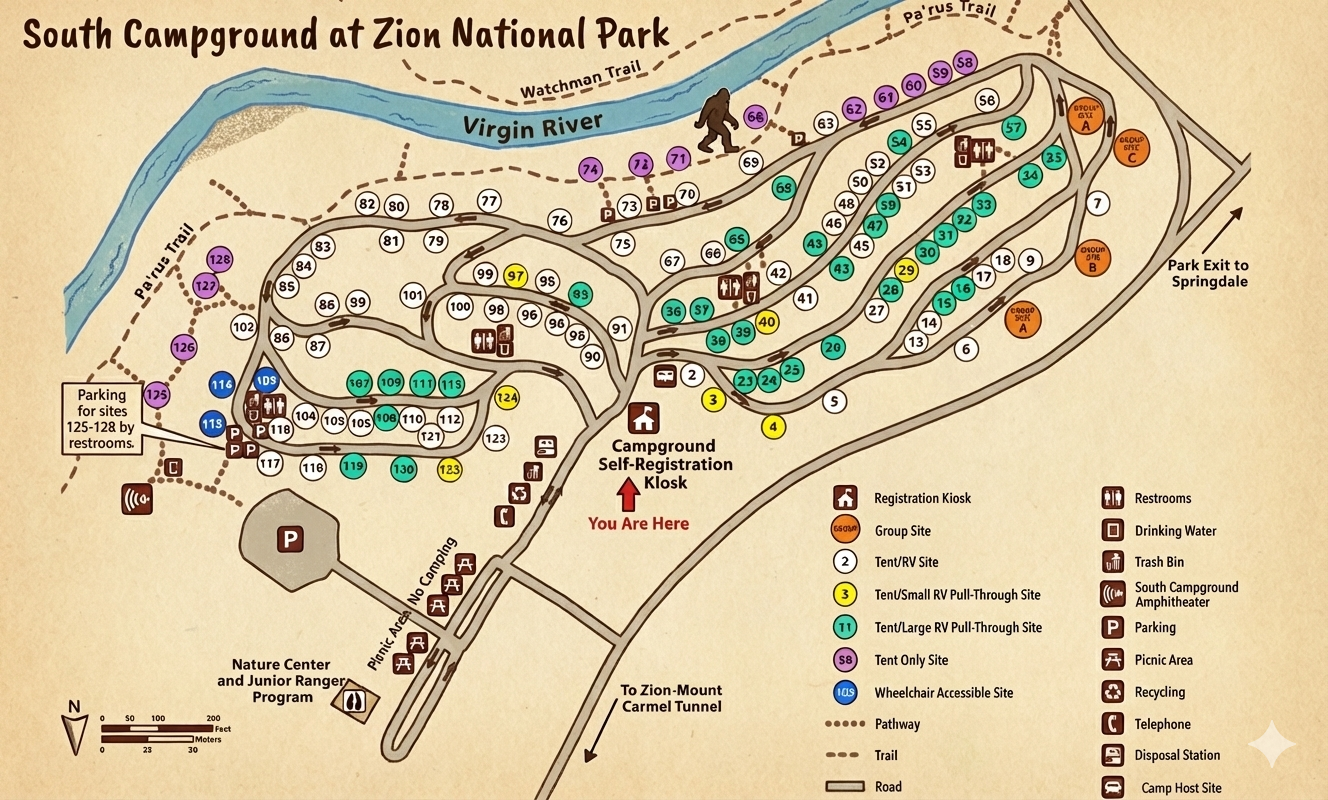
South Campground Map at Zion
South Campground Map Overview
The map shows South Campground tucked between the Virgin River and the main park road near the Park Exit to Springdale. The Watchman Trail and Pa'rus Trail run along the river side of the campground, making those river-adjacent sites stand out if you like quick trail access.
Inside the campground, numbers inside circles mark each campsite. A legend in the lower right explains the colors and symbols: registration kiosk, different campsite types, restroom and drinking water icons, trash and recycling, parking, picnic area, amphitheater, disposal station, camp host site, and more.
How the Roads Loop Through the Campground
From the main park road the entrance splits into a small network of one-way lanes that form several loops and spurs:
- The registration kiosk and “You Are Here” arrow sit near the middle, right where the incoming road divides.
- Roads branch north toward the Virgin River, curving under the Watchman and Pa'rus Trails while circling sites numbered roughly in the 30s–100s.
- To the east, the road bends toward group sites A–D and the arrow labeled Park Exit to Springdale.
- To the southwest, a spur drops to the large parking area, Nature Center, and Junior Ranger Program buildings, plus a picnic area where camping is not allowed.
Small black arrows on the map show the intended driving direction—follow these and you’ll naturally loop back toward the kiosk and exit without needing tight three-point turns.
Site Types & Color Coding on the Map
Each circle on the map has a number and a background color that matches the legend:
- Group sites (orange): Four large pads labeled GROUP SITE A–D near the eastern loops.
- Tent/RV sites (white, “2” icon in legend): Standard mixed sites scattered throughout most of the loops.
- Tent/small RV pull-through sites (yellow, “3” in legend): Short pull-through pads (for example, sites like 29 or 40) that work well for compact rigs.
- Tent/large RV pull-through sites (green, “11” in legend): Longer pull-through sites (around the 100s cluster) meant for larger RVs.
- Tent-only sites (purple, “58” in legend): A handful of car/tent pads close to trails and quieter walking zones.
- Wheelchair accessible sites (blue, “103” in legend): Marked accessible pads with nearby facilities and flatter approaches.
When you zoom in on the map, look first at the color to see the site type, then confirm the number against your reservation.
Facilities Icons to Watch For
The legend also includes small black-and-white icons for everything you’ll actually use during your stay:
- Restrooms: Toilet icons placed in several clusters around the loops.
- Drinking water: Faucet icons near restrooms and key junctions.
- Trash & recycling: Can and recycling symbols near parking pullouts and road intersections.
- South Campground Amphitheater: Speaker-style icon off one of the interior spurs.
- Parking areas: “P” icons, including a large lot near the Nature Center and another near sites 125–128.
- Picnic area / no camping: Table icons along the access road south of the main loop.