Bridge Bay Campground Map at Yellowstone National Park, Wyoming

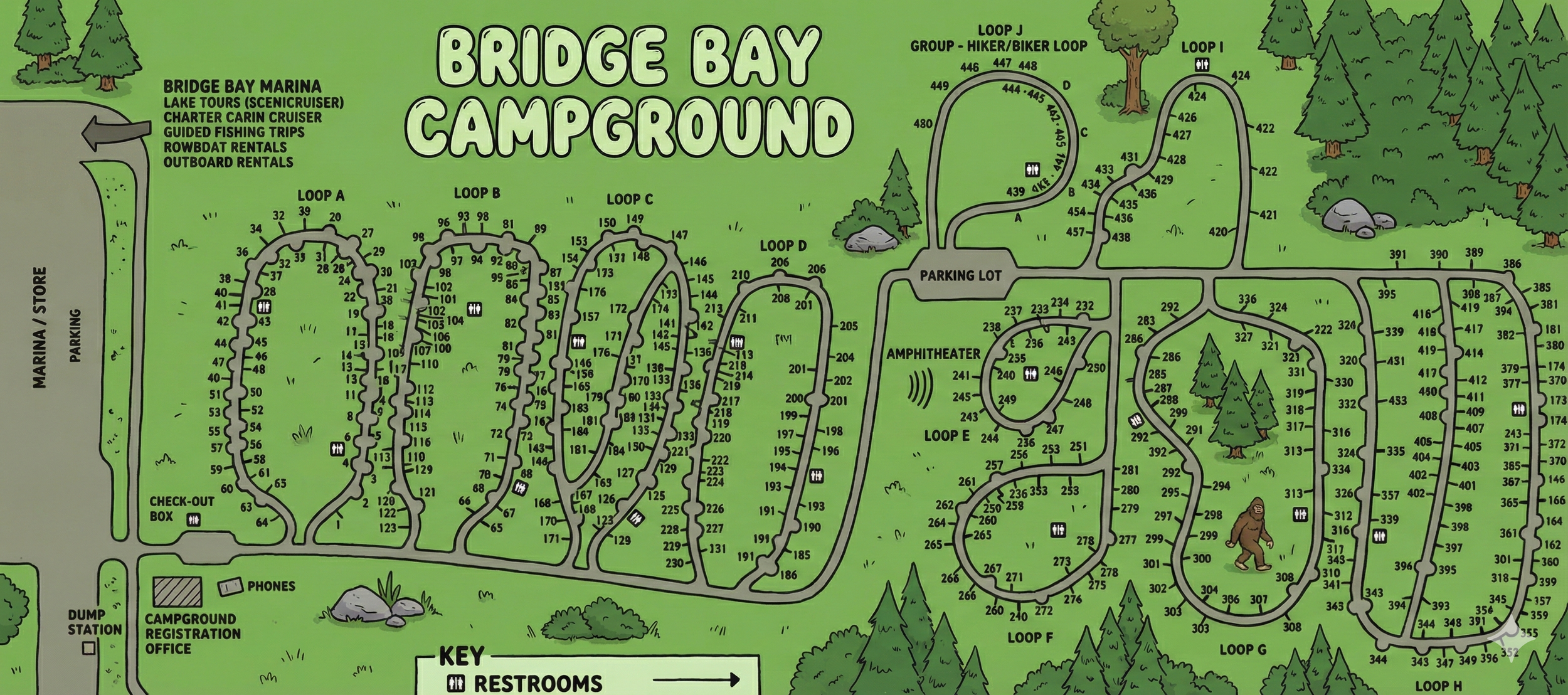
Bridge Bay Campground Map at Yellowstone
Bridge Bay Map Overview
The map shows Bridge Bay Campground arranged in a line of alphabet loops just uphill from the Bridge Bay Marina on Yellowstone Lake. Loops are labeled A through H, plus Loop J and Loop I on the upper right side. Each loop contains numbered sites, and a key at the bottom identifies black squares as restrooms.
All campground roads are one-way, forming oval or teardrop-shaped loops that you enter from a main spine road and exit back onto the same spine. The map also labels an amphitheater, parking areas, dump station, phones, and the campground registration office.
Loop Layout from A to I
Moving from left to right across the map, the loops follow a simple pattern:
- Loop A: First loop you hit after leaving the registration office, closest to the marina side of the campground.
- Loop B: Just to the east of A, another oval of sites wrapped around a central restroom icon.
- Loop C: Third loop in line, with sites numbering into the 150s and 170s range.
- Loop D: Narrower loop extending to the right of C, with sites in the high 100s and low 200s.
- Loop E: On the opposite side of the main road near the amphitheater, with a small inner circle of sites.
- Loop F: Just south of E, a rounded loop of sites 250s–270s.
- Loop G: Large, irregular loop containing a big cluster of 280s–330s sites and several restrooms.
- Loop H: Long, thin loop on the far right with high 300s and 400s site numbers.
- Loop J: Marked “Group – Hiker/Biker Loop” above the main road, with a handful of sites 440s–450s.
- Loop I: Separate loop to the upper-right with sites in the 420s, plus its own restroom icon.
If you’re scanning quickly, think of the campground as a row of loops A–D on one side of the access road and a cluster of loops E–H plus J and I on the other side.
Marina & Registration Area on the Map
On the left edge of the map, a shaded block labeled MARINA / STORE and parking marks the Bridge Bay Marina. Text above it calls out lake tours, charter cabin cruisers, guided fishing trips, rowboat rentals, and outboard rentals.
Just downhill from the camping loops you’ll see the campground registration office, a dump station, and a small symbol for phones. The check-out box sits near Loop A so you can drop your site card when leaving.
Facilities & Icons on the Bridge Bay Map
The key is simple, so most of the facilities are labeled with text instead of extra icons:
- Restrooms (black squares): Each loop has one or more squares showing restroom locations—use them as a reference point when picking a site.
- Dump station: Shaded symbol near the registration office at the lower left of the campground.
- Phones: Small labeled rectangles close to the office for pay-phone style access.
- Amphitheater: Wavy sound lines and “AMPHITHEATER” label between Loop E and the parking lot above it.
- Parking lots: Marked near the amphitheater and near Loop J’s access road.
Since the legend is minimal, most of your orientation comes from loop letters, site numbers, restroom squares, and the few bold labels like “Marina” and “Amphitheater.”
Zones to Consider on the Map
- Loops A–C: Closest to the marina and store—good if you want quick access to lake tours or boat rentals.
- Loop D & G: Long loops with multiple restroom squares, helpful for larger groups spread over several sites.
- Loops E & F: Near the amphitheater, convenient if you plan on attending evening ranger programs.
- Loop J (group / hiker-biker): Specifically labeled for hikers and bikers, set apart from the main RV loops.
- Loops H & I: Furthest from the marina traffic, at the far end of the main access road.
These suggestions are based purely on map layout—distance to facilities and nearby labels—not on noise levels or specific site size.
Bridge Bay Campground Map FAQ
Does the map show all of the loops and site numbers?
Yes. Loops A through H plus J and I are labeled, and every campsite has a number printed along the loop roads.
Can I see restroom locations on the map?
Restrooms are marked by black squares throughout the loops. The key at the bottom identifies these as restroom icons.
Where are the marina and amphitheater shown?
The marina and store appear at the far left with parking, while the amphitheater is labeled between Loop E and the adjacent parking lot on the right side of the map.
Is the dump station included?
Yes. The dump station is drawn near the campground registration office at the lower left, next to the main road into the campground.