Map of Lower Pines Campground at Yosemite National park, california

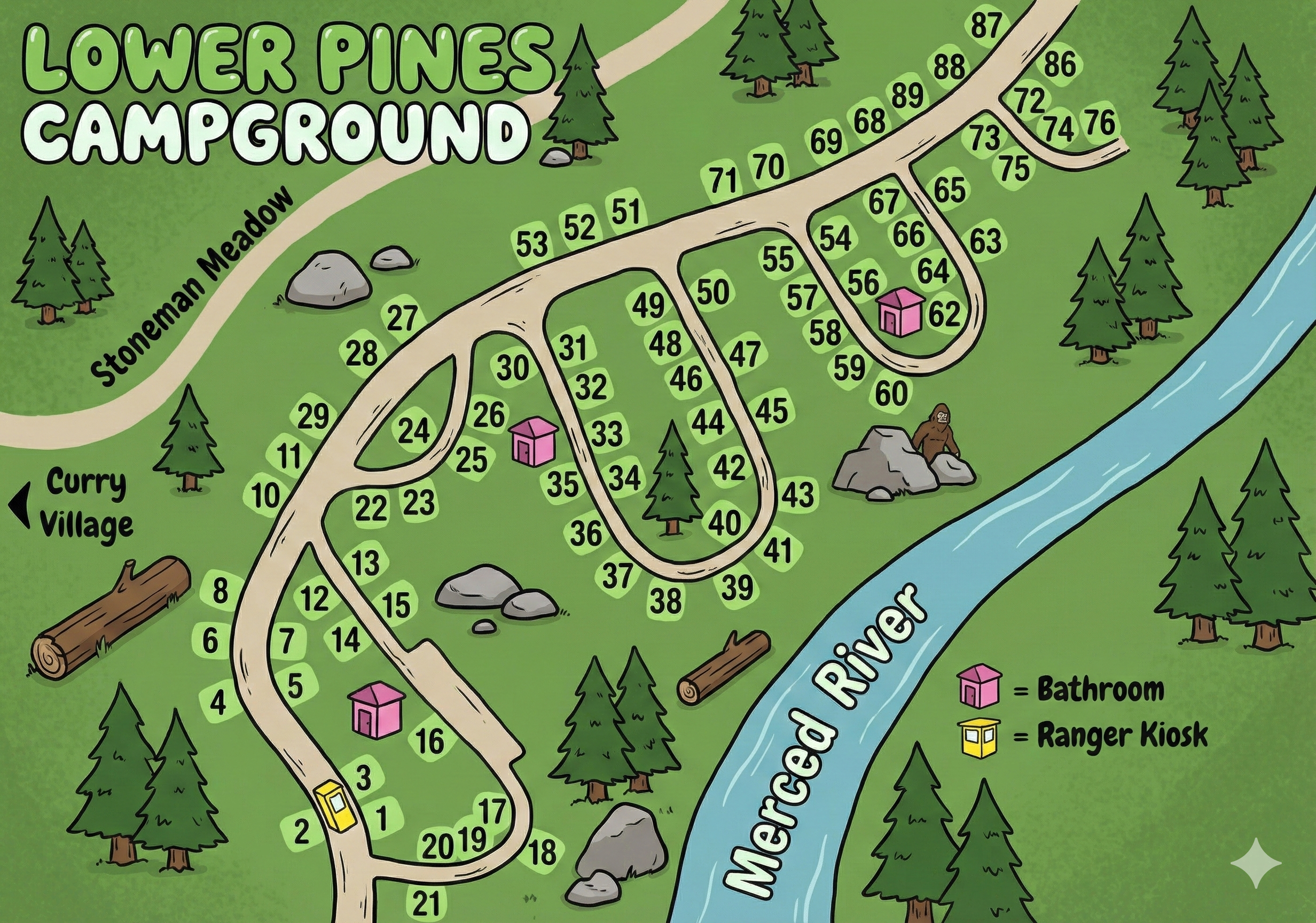
Map of Lower Pines Campground at Yosemite National Park
Lower Pines Campground Map Overview
Lower Pines sits between Stoneman Meadow on one side and the Merced River on the other, with a road network that forms a set of branching loops. Site numbers here run roughly from 1–88, with a group of short connectors weaving between the meadow edge and the riverbank.
Most restrooms are marked on the map as pink squares, and a single yellow square marks the ranger kiosk near the entrance. Curry Village lies immediately to the southwest, making this one of the most centrally located campgrounds in Yosemite Valley.
Overall Layout Along the Merced River
The main entrance road curves into a compact loop system:
- Sites 1–21 sit closest to the entrance and the ranger kiosk area.
- A central set of branching roads serves sites in the 20s, 30s, and 40s, positioned between the meadow edge and the river.
- The farthest loop follows the river and contains sites 50–76, eventually rising to the high numbers near 87–88.
- The Merced River forms the entire eastern boundary of Lower Pines, which helps with orientation.
Campsites nearest the river often have more direct access to the water corridor and river sound.
Site Loops & Number Patterns
The map does not label loops by name, but the road system creates three natural groups:
- Entrance Loop (sites 1–21): Includes the ranger kiosk and one restroom. Short, tight turns define this section.
- Central Branch (20s–40s): Winding roads serve the mid-range numbers, forming the inner core of the campground.
- Riverside Loop (50s–88): Parallels the Merced River, with restrooms placed near sites 35 and 62.
Numbers generally increase as you head north and east toward the river.
Restrooms, Kiosk & Map Symbols
The Lower Pines map uses simple visual markers that make navigation easy:
- Pink squares: Restrooms (near sites 17, 35, 62).
- Yellow square: Ranger kiosk at the campground entrance.
- The river itself is a major orientation anchor curving along the entire right side.
- Curry Village is labeled just outside the entrance, giving you a clear geographic reference.
How to Read the Lower Pines Map
- Locate your site number and find its loop grouping.
- Use the Merced River as the eastern boundary and Stoneman Meadow as the western side.
- Trace the branching one-way road until numbers fall in sequence.
- Note your closest pink restroom icon for night access.
- Look for the yellow kiosk icon if you're checking in or confirming information.
Because Lower Pines is compact, walking distances to restrooms and trail connections are short.
Lower Pines Campground Map FAQ
Where are the restrooms?
The map marks restrooms near sites 17, 35, and 62.
How do the site numbers flow?
Numbers start near the entrance (1–21), sweep through the central loops (20s–40s), and extend toward the river (50s–88).
What landmarks help with orientation?
Stoneman Meadow to the west and the Merced River to the east keep navigation simple.
Is the ranger kiosk shown?
Yes—it's the yellow square near sites 1–3.