Madison Campground Map, Yellowstone, Wyoming

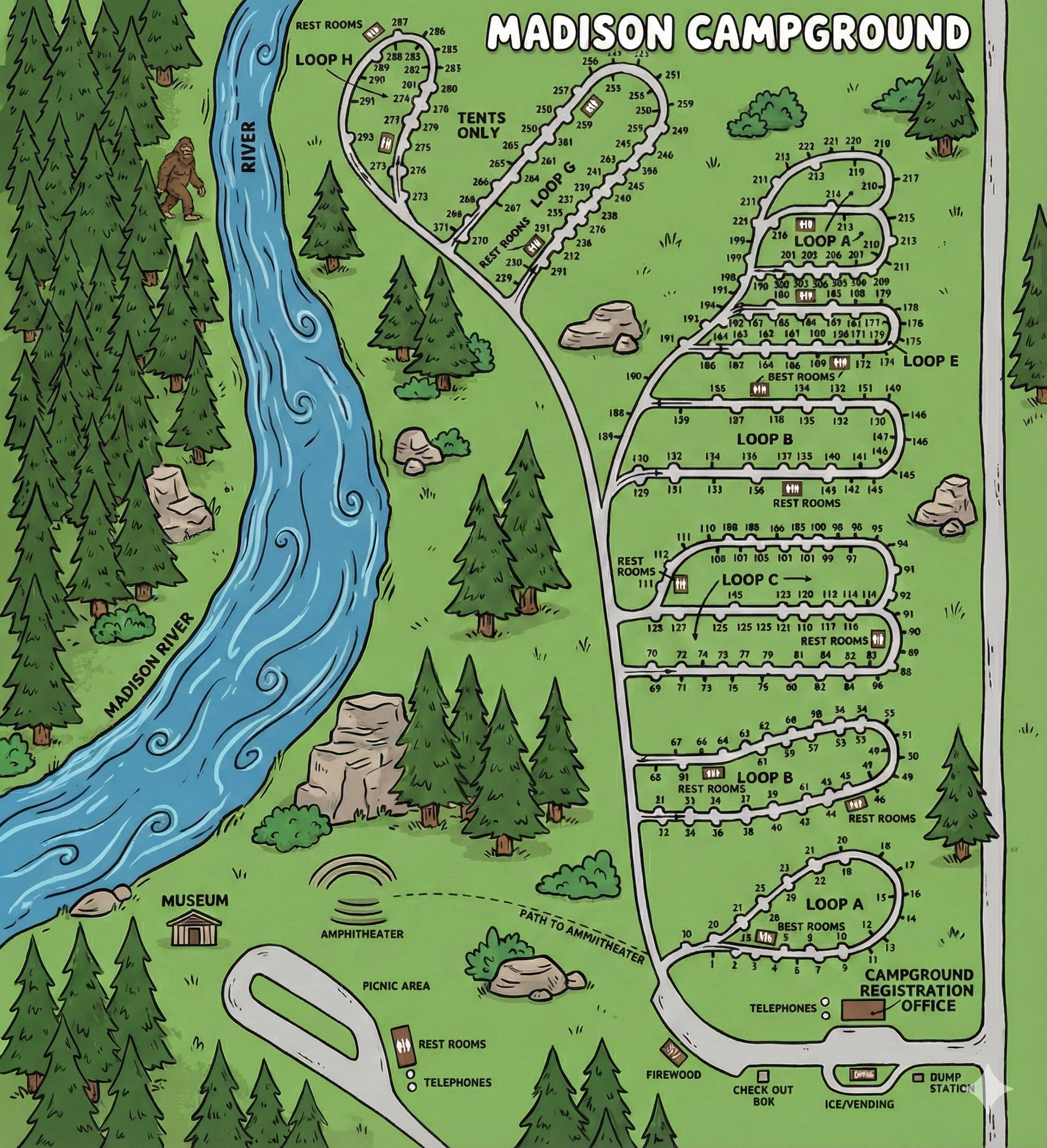
Madison Campground Map
Madison Campground Map Overview
Madison Campground is organized around a main internal road that branches into lettered loops. The map shows the Madison River along one side of the campground, with the outer loops (including upper loops like G and H) positioned closer to the river corridor.
The fastest way to navigate: identify your loop letter, then use the site number sequence drawn along that loop’s perimeter.
How the Campground Is Laid Out
- Lower hub (services): Registration office area with clustered service icons (check-out box, ice/vending, dump station, firewood) and phone symbols.
- Lower loops: Loop A and Loop B are closest to the service hub and entry road.
- Middle loops: Loop C (two rows of sites) feeds into Loop D and the larger Loop E.
- Upper loops: Loop F (compact), Loop G (large), and Loop H (tents only) sit toward the top of the map near the river side.
Most loops are long ovals with sites numbered along the outside edge; the map makes it easy to “walk” the numbers in order.
Loops A–H (What the Map Shows)
Quick loop cues: Loops are labeled by letter on the map; restroom blocks are shown in or near most loops. Loop H is labeled “Tents Only.”
- Loop A: Smallest numbered loop near the bottom; a restroom block is marked within the loop.
- Loop B: Next loop up; restroom blocks shown near the loop’s mid and far side.
- Loop C: Two long rows (upper and lower) with restrooms marked at both ends.
- Loop D: Mid-camp loop feeding into Loop E; restroom block shown along the lower edge.
- Loop E: Largest mid-to-upper loop with a long run of sites; restroom block marked along the interior edge.
- Loop F: Compact upper loop labeled with a restroom block at the center.
- Loop G: Large upper loop with a dense run of sites and a restroom block marked near the base connection.
- Loop H (Tents Only): Uppermost loop; a restroom block is marked near the top of the loop.
Facilities & Landmarks on the Map
- Campground Registration Office: Located at the lower right of the map near the entrance road.
- Dump station: Marked near the registration/entry service area.
- Ice/Vending, Firewood, Check-out box: Clustered in the same lower service hub.
- Telephones: Shown near the hub and again near the picnic area/restroom cluster.
- Picnic area: Shown toward the lower left with a nearby restroom block.
- Amphitheater: Marked with a dashed path to amphitheater from the service area.
- River edge: The map labels the Madison River along the left side, useful as a “which side of camp am I on?” anchor.
Using the Map on Arrival
- Confirm your loop letter first (A–H). This narrows navigation instantly.
- Use the registration office as the “bottom-right anchor” on the map.
- Once you enter the correct loop, follow the site numbers along the perimeter in sequence.
- If you’re in Loop H, remember it’s labeled tents only on the map.
- Pick a restroom landmark for night walking—restroom blocks are clearly marked by loop.
Madison Campground Map FAQ
How many loops does Madison Campground have?
The map shows Loops A through H.
Which loop is tents only?
Loop H is labeled “Tents Only.”
Does the map show where to find the dump station?
Yes — it’s marked near the lower service hub by the registration office.
Where are restrooms located?
Restroom blocks appear in or near most loops, with additional restrooms shown near the picnic area/service hub.